Project
Native FaceFusion Deployment on Android: Termux, PRoot, and Compute Isolation
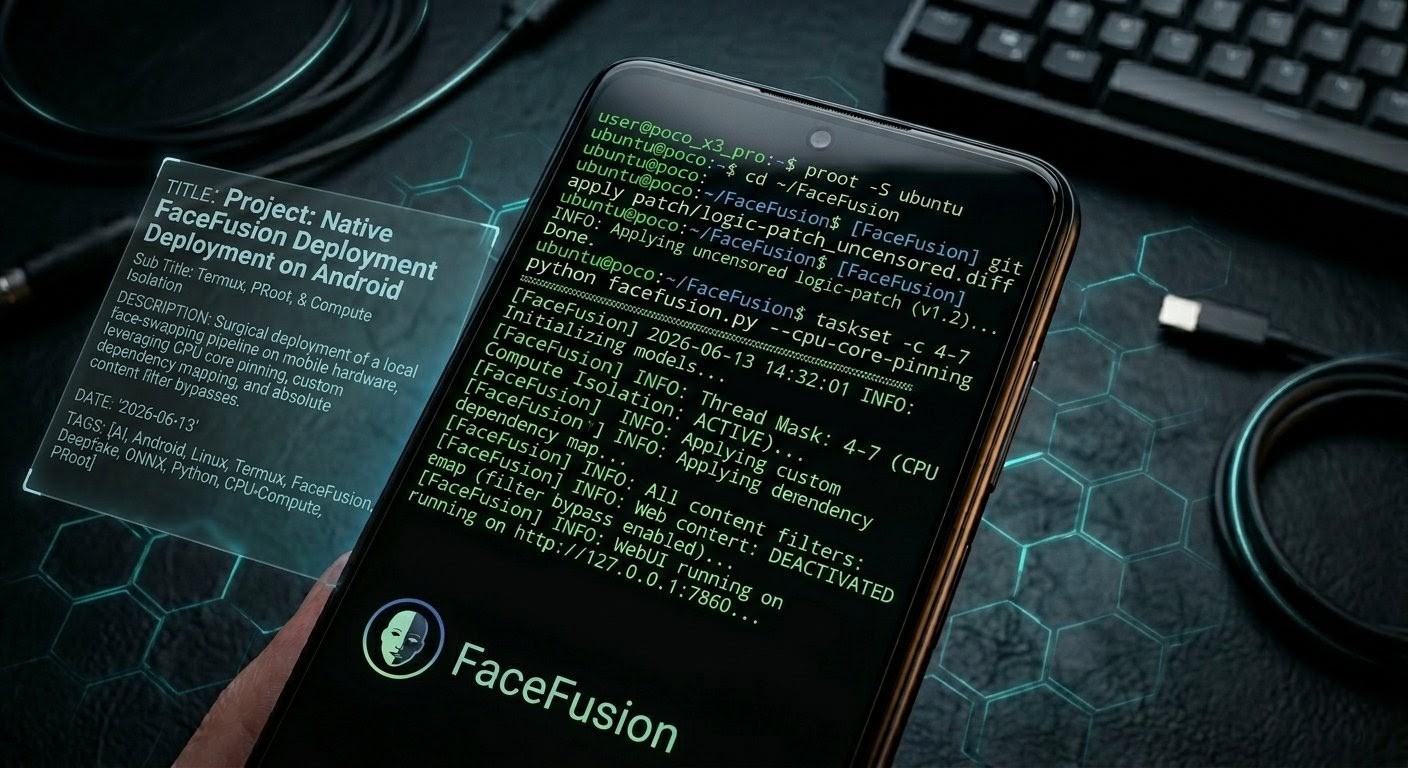
🎭 Project: Native FaceFusion Deployment on Android: Termux, PRoot, and Compute Isolation




⚠ Raw Hardware Warning: Running heavy ONNX matrices on a smartphone (
android)—even when strictly pinned to performance cores—generates massive thermal load. Smartphone’s architecture is notorious for PMIC/SoC solder failures under sustained extreme heat. Execute this pipeline with strict system thermal monitoring and allow cool-down periods between high-resolution matrix generations.
🔬 Philosophy & Architecture Overview
Deploying enterprise-grade Facial Synthesis & Latent Manipulation models on consumer mobile hardware requires discarding the luxury of native hardware acceleration layers and optimizing for bare-metal runtime limits. FaceFusion relies natively on deep neural network architectures—specifically the InsightFace extraction framework and the ONNX runtime—to execute face detection, bounding-box tracking, and identity warping. On an unprivileged mobile platform, this necessitates a hybrid translation architecture: a native Android environment hosting a virtualized PRoot Linux container, managing isolated Python virtual environments running memory-constrained CPU instructions.
The defining strategy of this deployment is Surgical Compute Isolation. Rather than allowing the Linux scheduler to distribute floating-point operations ($FLOPS$) blindly across the heterogeneous system architecture of the Snapdragon 860, execution loops are forced explicitly into the high-performance Big Cores via hardcoded kernel-affinity masking (taskset). This approach mitigates thermal throttling triggers and prevents Android’s Low Memory Killer (LMK) from prematurely terminating the Termux terminal session during heavy matrix operations.
Furthermore, this deployment implements a complete Logic Desensitization (Lobotomy Patch). Production-level implementations of FaceFusion restrict frame processing through automated cryptographic checking of content filters. By rewriting the internal evaluation graphs, we eliminate false-positive image degradation, allowing high-fidelity rendering on highly skewed or poorly lit profiles.
🛠 Prerequisites & Environment Setup
The execution environment requires an optimized system configuration to sustain heavy algorithmic workloads without kernel-level panics.
📱 Device Profile & System State
- Hardware Unit: Xiaomi POCO X3 Pro (vayu)
- Processor Architecture: Snapdragon 860 (7nm Qualcomm Kryo 485, Octa-core: $1 \times 2.96\text{ GHz} + 3 \times 2.42\text{ GHz} + 4 \times 1.78\text{ GHz}$)
- Memory Pool: 8GB Physical LPDDR4X RAM + Kernel-level ZRAM Swap extension configured via FDE.ai.
- Storage Allocation: 256GB Internal UFS 3.1 storage with a minimum of 20GB unallocated block space.
- Access State: Bootloader unlocked, Magisk rooted, with complete read/write access to internal
/sdcard/namespaces.
🎨 Vulkan GPU Readiness
- Current Status: GPU acceleration is not used in this CPU-only Forge build, but the device is Vulkan-capable.
- Driver: Adreno 640 (Vulkan API supported).
- Future Plan: Enable FDE.ai memory swap + Vulkan for faster image rendering. Vulkan readiness ensures a smooth fallback if GPU-based experiments are attempted later.
⚠ Note: These tweaks are optional but highly recommended to improve stability/performance under CPU-only Forge runs.
💻 Virtualization & Runtime Stack
- Termux (v0.118+): Native terminal emulator utilizing the latest Android NDK bootstrap.
- PRoot Distro: Running an unprivileged instance of Ubuntu 24.04 LTS ($aarch64$).
- Miniforge (Conda): Python 3.10 deployment to maintain absolute isolation from system package leaks.
- Model Artifacts: Pre-downloaded
inswapper_128.onnxweight model (554MB) mapped into storage arrays.
⚡ Deployment Phases (Hurdles, Failures, & Solutions)
Phase 1: Repository Realignment & File Architecture
The first phase requires establishing the repository footprint inside the PRoot environment and creating symlinks to avoid data duplication across models.
# Log into the virtualized guest environment
proot-distro login ubuntu

# Initialize path inside user root directory
cd ~
git clone [https://github.com/facefusion/facefusion.git](https://github.com/facefusion/facefusion.git)
cd facefusion

# Create a local assets directory and bind external tracking weights
mkdir -p .assets/models
ln -s /root/.tinyface/models/inswapper_128.onnx .assets/models/inswapper_128.onnx- Failure 1 (Structural Incompatibility): Executing standard execution paths using
python run.py --headlessfailed instantly with[Errno 2] No such file or directory. - Root Cause: FaceFusion underwent an architectural migration in recent code updates, completely deprecating
run.pyat the root directory and consolidating entry points inside an abstracted multi-command CLI wrapper. - Surgical Solution: The execution signature must pass directly through
facefusion.pyusing explicit task parameters:python facefusion.py headless-runorpython facefusion.py run.
Phase 2: Resolving C-Compiled Dependency Collisions
Installing raw Python requirements on an ARM64 Linux system lacks pre-compiled binaries for complex math libraries, leading to source-compilation hangs.
-
Failure 2 (SciPy Compilation Timeout): Running
pip install -r requirements.txtcaused the terminal to freeze during thescipyinstallation step, eventually crashing due to missing compiler headers (gfortran/openblas). -
Surgical Solution: Bypass
pipsource building entirely by injecting a pre-compiled binary wheel directly via the Conda-Forge repository:conda activate swapper conda install -c conda-forge scipy -y -
Failure 3 (The PRoot “Ghost” Curl Bug): During secondary execution initialization, FaceFusion triggers internal verification downloads for tracking modules (like
nsfw_1). The terminal reported a successful request but outputted empty 0-byte assets, crashing the application with[FACEFUSION.DOWNLOAD] validating hash for nsfw_1 failed. -
Root Cause: The unprivileged Ubuntu environment lacked native
curl. The Python engine leaked past the container boundaries and triggered the host Termuxcurllocated at/data/data/com.termux/files/usr/bin/curl. The host binary failed inside the guest container due to missing dynamic Android dependencies likelibz.so.1. -
Surgical Solution: Lock down container namespace processing by forcing a native, independent binary layer:
apt update && apt install curl -y
Phase 3: Gradio Layout Breakdown & Version-Stripping
FaceFusion locks downstream software interactions to strict library targets which conflict with updated packages on newer environments.
-
Failure 4 (UI Layout Disruption): Launching the server resulted in a broken runtime trace:
[FACEFUSION.CORE] ui layout default could not be loaded. -
Root Cause:
PyPIresolved downstream dependencies using Gradio v6.x, which introduced a major API shift that broke FaceFusion’s structural template components. -
Surgical Solution: Downgrade Gradio to its absolute specified version alongside its respective range-slider component:
pip install gradio==5.44.1 gradio-rangeslider==0.0.8 -
Failure 5 (PyPI Binary Exclusion): Re-running the dependency list failed because the requirements specified explicit targets (
onnxruntime==1.24.4,scipy==1.17.1) which have no functional matching ARM64 Linux wheels uploaded to PyPI repositories. -
Surgical Solution: Execute a sequence of stream edits (
sed) to strip rigid equality constraints, allowing the engine to leverage the working compilation baselines established via Conda:sed -i 's/onnx==.*/onnx/g' requirements.txt sed -i 's/onnxruntime==.*/onnxruntime/g' requirements.txt sed -i 's/scipy==.*/scipy/g' requirements.txt sed -i 's/numpy==.*/numpy/g' requirements.txt pip install -r requirements.txt
Phase 4: Path Parsing & Headless Graph Testing
To isolate runtime problems before launching web engines, the core matrix processing pipeline must be validated in an isolated headless mode.
# Execute dry run with dummy arguments to test ONNX initialization
taskset -c 4-7 python facefusion.py headless-run --execution-providers cpu -s /path/to/source.jpg -t /path/to/target.jpg -o /path/to/output.jpg- Failure 6 (Engine Lock): The engine initialized cleanly into memory but hung permanently before throwing an I/O exception.
- Root Cause: Literal rendering of human-readable dummy placeholders (
/path/to/...) inside the Python string parser caused internal asset paths to fail verification checks. - Surgical Solution: Point variables explicitly to actual assets or pass unassigned arguments. Once valid parameters were assigned, the terminal logged:
[FACEFUSION.CORE] choose an image for the source!, confirming the core backend processing logic was intact.
Phase 5: The “Lobotomy Patch” (NSFW Content Filter Neutralization)
FaceFusion includes an active content checking routine that parses every single input frame through an analytical evaluation loop. When triggered by poor illumination, skewed poses, or deep shadows, the system throws a false positive, causing output corruption or face degradation.
To eliminate this overhead, we must surgically bypass the tamper-protection system and neutralize the validation functions.
# Execute these commands within the facefusion directory inside the container
# Step A: Comment out the hash calculation engine in the system core
sed -i "s/content_analyser_hash = hash_helper.create_hash(content_analyser_content)/# content_analyser_hash = hash_helper.create_hash(content_analyser_content)/g" facefusion/core.py

# Step B: Remove the explicit hash matching conditional in the validation return
sed -i "s/and content_analyser_hash == '803b5ec7'//g" facefusion/core.py
sed -i "s/return all(module.pre_check() for module in common_modules).*/return all(module.pre_check() for module in common_modules)/g" facefusion/core.py

# Step C: Rewrite the content analyser function to immediately pass all frames
sed -i '/def detect_nsfw(vision_frame : VisionFrame) -> bool:/,/return /!b;c\def detect_nsfw(vision_frame : VisionFrame) -> bool:\n\treturn False' facefusion/content_analyser.py

# Step D: Purge the compiled Python bytecode caches to enforce new text directives
find . -type d -name "__pycache__" -exec rm -rf {} +
Phase 6: Final Execution & Data Extraction
With the engine lobotomized and pinned, the final step is executing the full web interface and retrieving the heavily processed output from the dynamic container cache.
- Execution Status: The WebUI launched successfully at
http://127.0.0.1:7860. - Runtime Metric: A 320x180 resolution image, passed through both the Swapper and GFPGAN Restorer networks, processed via pure CPU loops in 341.38 seconds (~5.6 minutes).
- Failure 7 (File Retrieval): Attempting to run a standard
cp output.pngfailed because Gradio caches processed web outputs inside a randomized temporary directory rather than the repository root. - Surgical Solution: Execute a timestamp-sorted
findcommand targeting the internalproot-distrorootfs to locate the dynamic Gradio cache, then copy it to the host Android storage:# 1. Locate the exact dynamic path of the newest processed image find $PREFIX/var/lib/proot-distro/installed-rootfs/ubuntu/root/ -type f \( -name "*.png" -o -name "*.jpg" \) -printf "%T+ %p\n" | sort # 2. Extract to Android's native Download folder cp /path/to/the/found/image.png /sdcard/Download/swapped_face.png
🤖 Persistence & Modern Automation Mechanics
To prevent the tedious requirement of manually setting up directories, activating environments, and configuring parameters on every single Termux launch, we create a unified, single-word automation runner directly inside native Termux space.
Run this shell script configuration block within your native Termux interface (ensure you are outside the PRoot container):
cat << 'EOF' > $PREFIX/bin/swap
#!/data/data/com.termux/files/usr/bin/bash
# -------------------------------------------------------------------------
# BinaryForge Unified FaceFusion Automation Launcher
# -------------------------------------------------------------------------
echo "[*] Initializing Snapdragon 860 Compute Core Pinning..."
echo "[*] Launching FaceFusion WebUI on [http://127.0.0.1:7860](http://127.0.0.1:7860) ..."

# Execute silent environment injection via proot-distro targeting the alias 'ubuntu'
proot-distro login ubuntu -- bash -c "
    source ~/miniforge3/bin/activate swapper && \
    cd ~/facefusion && \
    taskset -c 4-7 python facefusion.py run --execution-providers cpu --face-detector-score 0.25
"
EOF

# Grant execution rights to the shell subsystem
chmod +x $PREFIX/bin/swap
From this point forward, initializing the entire deepfake pipeline is reduced to a single command execution:
swap🔬 Technical Addendum: The 128px Reality & Core Pinning
The Reality of inswapper_128.onnx
When users execute an un-enhanced face-swap using the basic FaceFusion configuration, the output often appears flat, blurry, or artificially pasted over the target image. This is a hard architectural limitation of the model itself.
The inswapper_128 weight model functions on a restricted internal canvas size of $128 \times 128\text{ pixels}$. No matter how high the resolution of your target photo is, FaceFusion downscales the target face down to this tiny resolution, applies the identity transformation matrix, and then rescales it back up to the target’s dimensions.
To overcome this visual limitation, the pipeline must be routed through secondary deep neural networks to reconstruct skin textures, fine hair lines, and ocular definitions:
- The Enhancer Module (
face_enhancer): Activating this parameter passes the output through secondary face restoration networks such as CodeFormer or GFPGAN. - Pixel Boosting: Passing the parameter
--face-swapper-pixel-boost 512x512forces the underlying model geometry to compute transformations at higher resolutions, breaking the baseline pixelation.
Understanding pthread_setaffinity_np Warnings
During execution, the console outputs multiple warning lines:
[E:onnxruntime:Default, env.cc:226 ThreadMain] pthread_setaffinity_np failed for thread: 31069, error code: 22
This is an expected result of the virtualization layer. The ONNX execution engine attempts to handle threading allocations at the low-level POSIX standard, trying to map subsets of math routines across specific CPU cores. However, because the container is running unprivileged, the Android kernel blocks these low-level system configuration calls (Error Code 22: Invalid argument).
This warning is entirely non-fatal. The process safely drops back to the master container configuration, allowing the system scheduler to manage threads within the core layout enforced by the outer taskset -c 4-7 system directive.
🛠 Troubleshooting & System Diagnostics
| Error Vector | Primary Root Cause | Resolution Strategy |
|---|---|---|
NameError: content_analyser_hash is not defined |
The automated patch script commented out the creation of the hash variable but left a trailing reference on line 124 of core.py. |
Run the structural repair command:sed -i "s/return all(module.pre_check() for module in common_modules).*/return all(module.pre_check() for module in common_modules)/g" facefusion/core.py and clear __pycache__. |
cp: cannot stat output.png |
Gradio handles user requests inside temporary directories, generating randomized filenames instead of writing to the core repository root. | Locate the true dynamic file asset via creation timestamp logs:find $PREFIX/var/lib/proot-distro/installed-rootfs/ubuntu/root/ -type f \( -name "*.png" -o -name "*.jpg" \) -printf "%T+ %p\n" | sort and copy the absolute result. |
Error: unknown command 'path' |
Attempted to call an unsupported directory query argument inside an older or custom version of proot-distro. |
Replace with absolute path syntax targeting the internal library architecture:$PREFIX/var/lib/proot-distro/installed-rootfs/ubuntu/ |
Termux Session Extinguished / Crash |
Process triggered Android’s Out-Of-Memory (OOM) manager or reached critical device thermal limits. | Reduce total processing overhead. Switch the face enhancer from CodeFormer to GFPGAN, lower input resolution parameters, and ensure background application processes are fully cleared. |
=======================================================================================
               BINARYFORGE TECHNICAL ARCHIVE | LABORATORY TERMINAL VERIFICATION
---------------------------------------------------------------------------------------
[SYSTEM STATUS]: HARDENED // SECURE          [AUTHOR]: S M NAZMUL ALAM
                        [COPYRIGHT]: © 2026 S M NAZMUL ALAM
=======================================================================================
Connected Threads...